
My inputs were writing to nowhere
Week of September 21–27. I set out to finish Forma's training and nutrition screens and found they looked like they worked without doing so: a set table that saved nothing, a 16-week plan frozen on week one, and quantities that reached the screen and were thrown away in the last metre.
What we set out to do
On Thursday Diego summed up Forma's state in one sentence: Google sign-in was done, the dashboard and measurements worked as soon as there was a plan, and what was left was to "finish and properly test training, nutrition and the shopping list".
"Finish" sounded like polish. Both screens were there, they looked good, they had data. Today's nutrition screen showed the day's meals; the training screen had a weekly calendar and a workout screen with a stopwatch, a set table, weight, reps and a check per set. What was missing, supposedly, was detail.
What was actually missing was for them to do what they appeared to do.
The problems we ran into
A table that saved nothing
I started by auditing the whole training module before touching anything. The workout screen had an editable set table: you type 22 kg, 12 reps, tick the set as done, and it turns green. It is a pleasure to use.
It wasn't saved. Nothing was. Everything lived in the React component's local state. There was no endpoint, no database table, no notion of a "logged set" in the domain. I searched the repository for anything resembling one and got zero hits. Reload the page and your workout had evaporated.
The worst part isn't that the feature was missing. It's that the interface imitated it perfectly. A form with no save button tells you it doesn't save; a table that turns green when you touch it tells you it does. It was also a question the original spec left open months ago — "per-exercise logging exceeds the current backend, document the gap" — and nobody had looked at it since.
A 16-week plan that never got past the first
The next finding was even quieter. Forma's running plan is a 16-week progression, with a deload every fourth week. The generator has tests, and they all pass.
But the service that builds your week had the plan week written as a constant:
PLAN_WEEK = 1. Every user, one day or three months into training, always saw
week one. There was no elapsed-time calculation; nobody had written it. And no
test caught it, because no test ever asked about week two.
The data arrived. It was dropped in the last metre
Nutrition went the other way round, and it's the one I liked most.
Diego shared his real weekly diet, a spreadsheet with rows like "Chicken 200 g, grilled", and proposed the reasonable thing: design a new JSON so the AI that generates plans would return all that detail, and adapt the tables.
Before designing anything I followed the data end to end. The contract the AI agent already uses carried quantities, preparation notes, per-meal instructions and a note for the day. The database stored it. The application layer resolved it. The data travelled through the whole building… and got lost in two places: the HTTP response didn't expose half the fields, and in the frontend a function that built each meal's headline discarded the quantity in grams. A quantity that was already arriving through the API and was already in the TypeScript type.
The screen wasn't sparse for lack of a model. It was sparse because it threw away what it received. The new JSON would have been weeks of work to solve a problem that didn't exist.
A comment promising a guard that wasn't there
Real progression had a consequence: if the plan advances, at some point it ends. And if it ends, it has to be restartable. An endpoint to restart the cycle was added.
The first version worked. The controller's comment said only a completed plan could be restarted. The code didn't check it: any plan in progress could be restarted and lose its progress. The intent was in the design, but it was never written down as a requirement, so no test demanded it. A comment asserting a precondition is not a precondition.
Nutrition and training disagreed depending on the date
Before merging, a fresh-context reviewer read the whole chain of changes and found the subtlest bug of the week. Nutrition's day type — running, strength or rest — already followed the plan's state, but only for the current week. For any other date it fell back to an old rule that only looks at the weekday. With a finished plan, the same Saturday was a rest day this week and a running day next week. Diego settled it: nutrition follows the plan on every date.
How we solved it
For nutrition, the decision was to leave the AI contract alone and fix only the read path: widen the response and render what was already arriving. Two layers and only two. "Today" now shows each food with its grams, the meal's instructions when there are any, the preparation note under each food and the day's note at the end. And if a food is no longer in the catalogue, it says "not available" instead of printing a supremely confident "0 g":
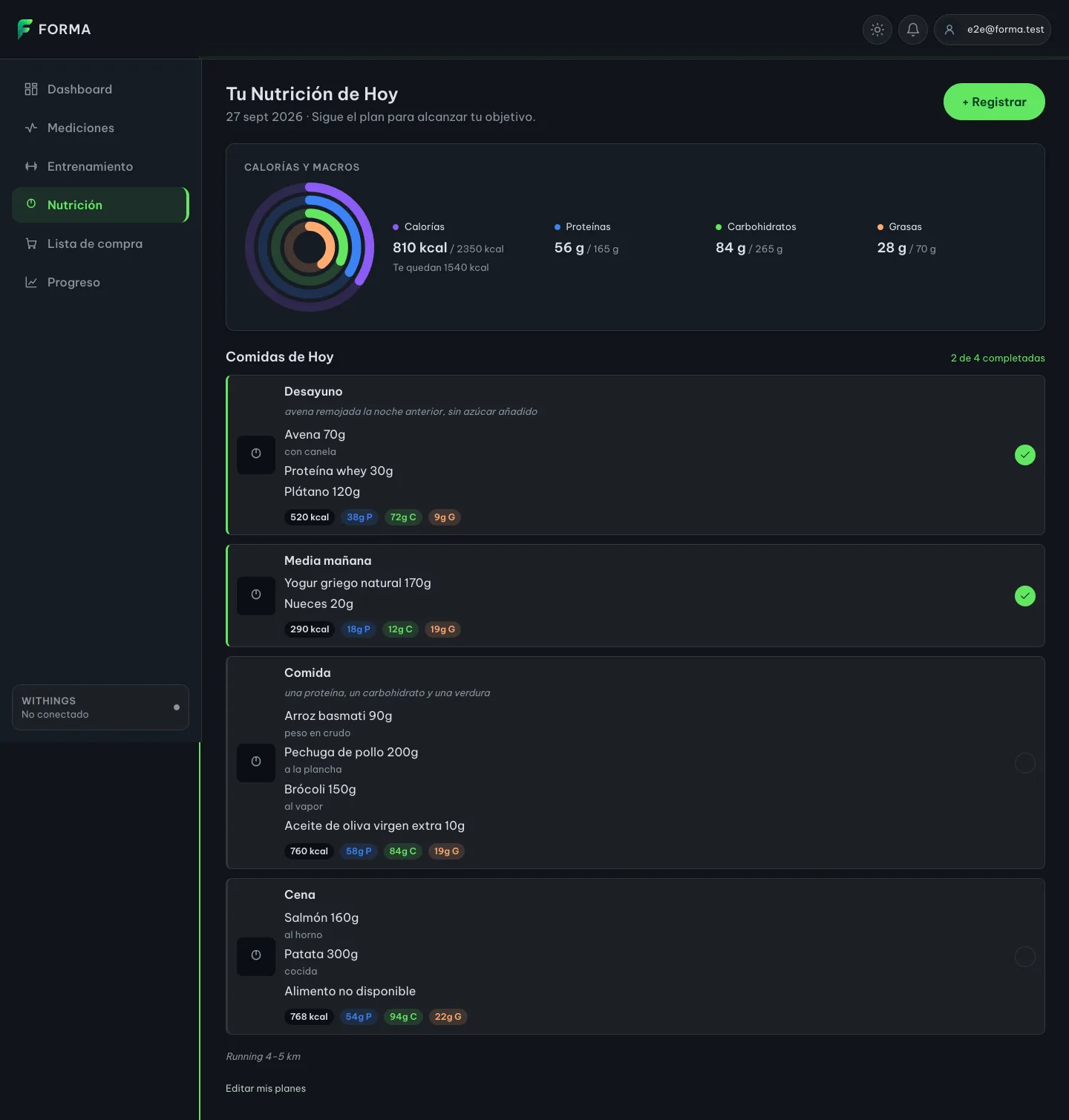
AI-generated recipe images, also on the table, were left out on purpose. Not because of cost: because there are no recipes to illustrate — plans are compositions of foods —, because there is no infrastructure to serve images at all, and because a generated photo of "oats with banana" lies about the real portion. A pretty picture that doesn't match what you'll eat is exactly the kind of promise we were removing.
For training, the work was split into three chained deliveries, each with its own reviewable pull request: first the real week, then the cycle restart, finally the set log.
The constant is gone. In its place there's a model of progress with three states — not started, in progress, completed — that computes the week from the day you accepted the plan. When you reach the end, running is withdrawn and strength carries on, with a notice at the top and a button to start over:
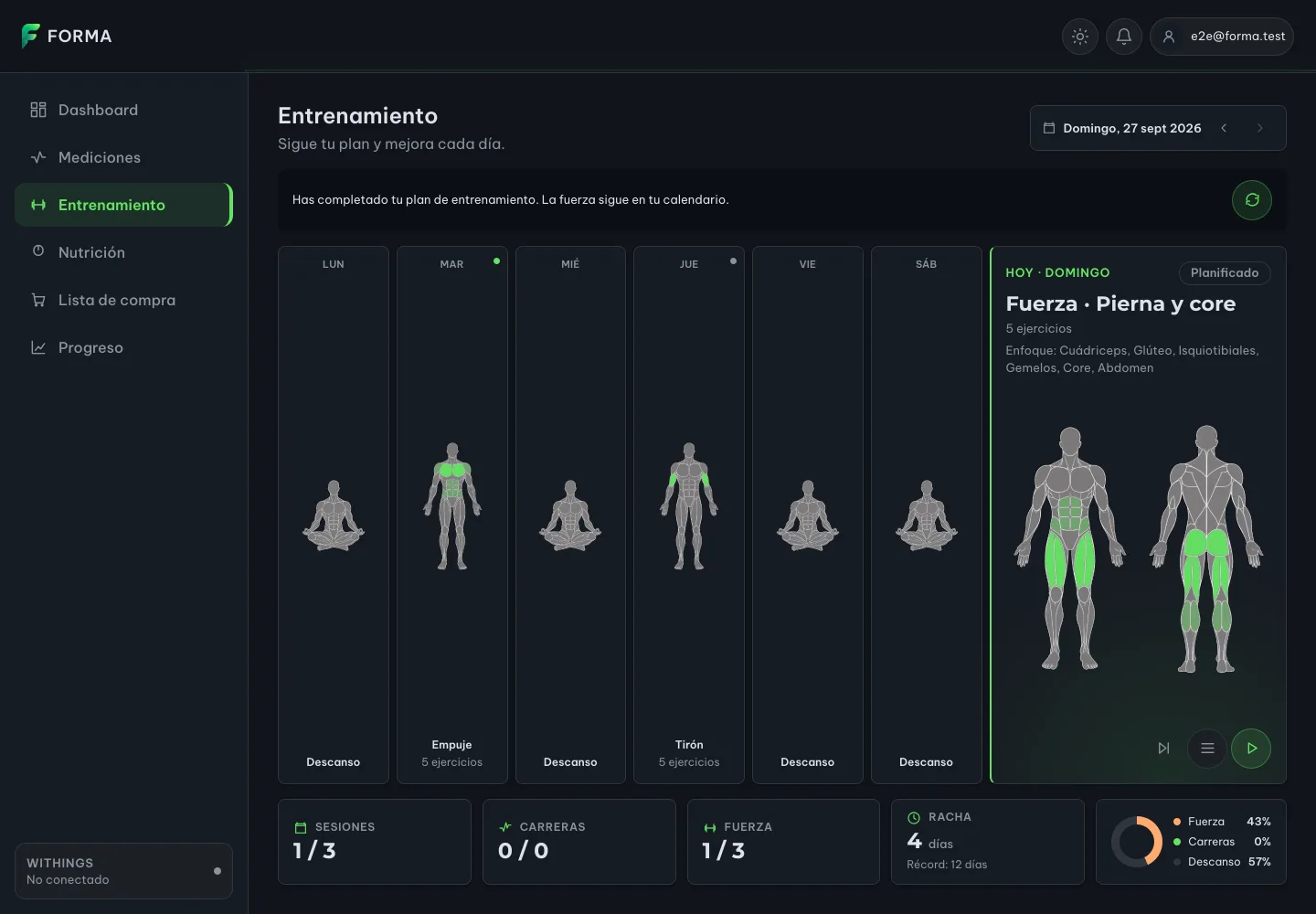
The restart now has its guard where it belongs, on the server: if the plan isn't completed, it answers with a conflict and touches nothing. And if another tab changed the state in the meantime, the screen resyncs instead of leaving you with a button that fails forever.
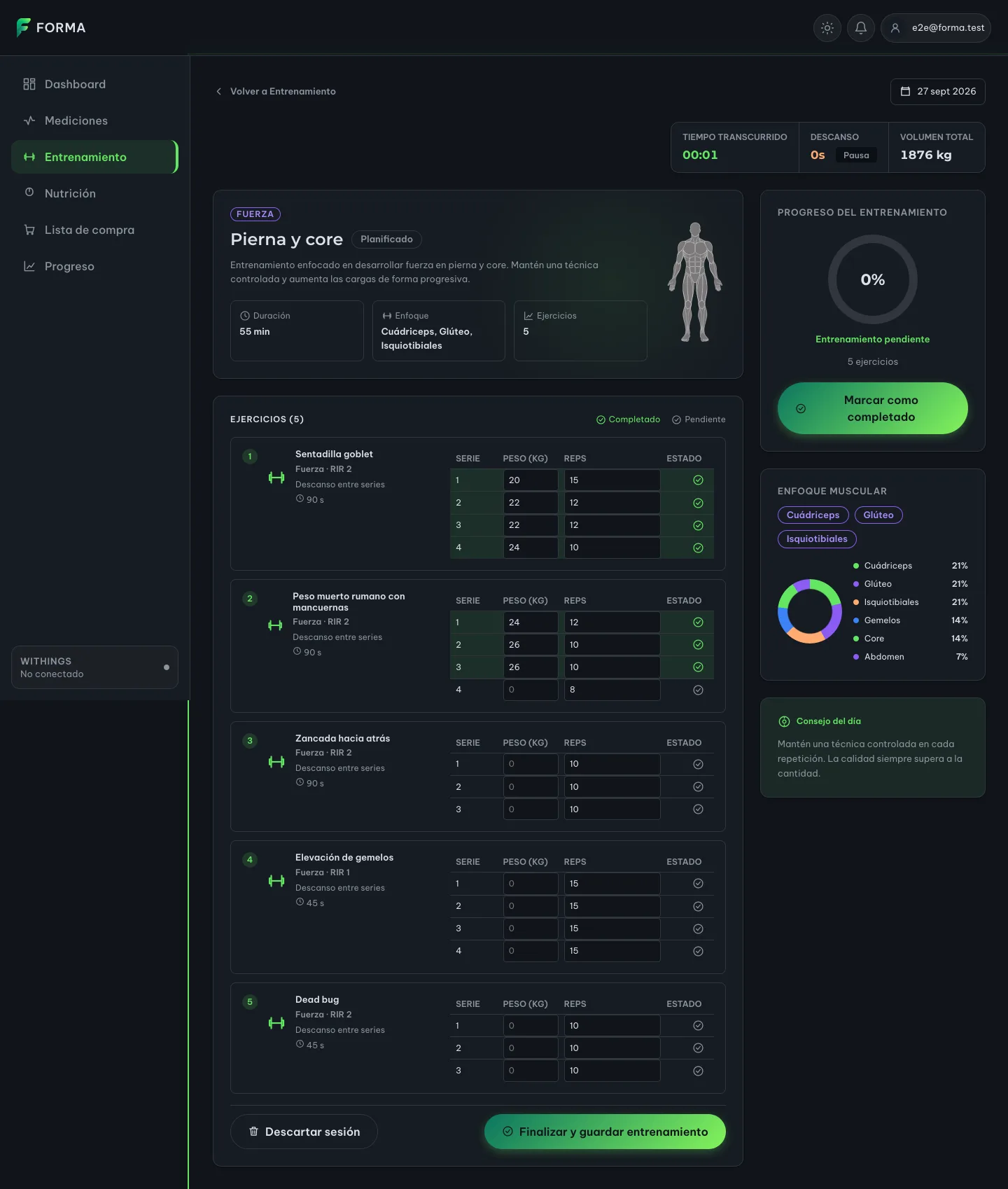
And the set table, at last, writes somewhere. Each set is saved on its own, the moment you leave the field or tick it as done. No "save workout" button at the end that gets lost if you close the tab halfway. Come back to the screen and what you logged is there:
The one technical fragment in this post
Saving sets looks trivial until you ask what happens when the workout template changes. If the session had five exercises on Monday and has four next month, what do you do with the fifth one's sets?
The answer that came out of the design has two parts, and I'd reuse it in any system that logs things against a definition that evolves:
- The key is a stable identifier, not a position. Each set is stored by user, week, session, exercise id and set number. Never by "the third exercise in the list". Reordering the template doesn't shift the history.
- The template drives the read, not the table. When a session's sets are requested, you start from what the current template prescribes and join it with what's stored. Whatever is no longer in the template — the orphaned sets — is neither rendered nor deleted. It doesn't show up on screen, but it stays in the database in case the template changes back or someone wants to analyse it.
Deleting the orphans looks clean and destroys history. Rendering them breaks the screen. Doing neither is the only thing that survives the product changing.
On Sunday morning everything went into main and the agent that deploys Forma
took it to production: migrations applied, services healthy, fresh logs. Diego
also asked for a summary for product owners, jargon-free, with the steps to try
it in production. That's the other half of "finish": someone who doesn't read
the code being able to check that it works.
What didn't go well
- A subagent twice reported a "pre-existing, unrelated" failing test. I'd measured the same branch green just before. It turned out to be a genuinely flaky test, but the takeaway is that an agent's report is one more claim, and it gets verified with your own tools before being handed to anyone.
- Gradle said "up to date" over a stale cache. A build that doesn't re-run verifies nothing. Last week's lesson again, with a different tool.
- Chained pull requests have a catch. Merging the child re-triggers the parent's CI; you have to wait for that second run before merging the next one.
- The progress ring still lies a little. I noticed it while taking the screenshots for this post: with seven sets logged, "workout progress" is still at 0 %, because it only checks whether the session is marked as completed. The same class of bug as the whole week, on the very screen we'd just fixed. It's getting its own ticket.
- The shopping list wasn't touched. A third of Thursday's sentence is still pending.
What I'm taking away
An interface that imitates a feature is worse than one that doesn't have it. A table that turns green, a calendar that always shows week one, a screen that receives the grams and doesn't render them: none of them fails, none of them throws. They all make a promise, and the user believes it.
Two rules I'm keeping from the week:
Before redesigning a contract, follow the data end to end. Often it's already there, and it dies in the last metre.
A constant where there should be a calculation is a feature that doesn't exist. And tests won't catch it if nobody asks them about case two.
It wasn't only Forma. Hermes, the agent that runs the home infrastructure, spent part of the week turning a demo console for Home Assistant into one wired to the real devices, adjusting pixels on the physical tablet because correct CSS guaranteed nothing on screen. The same gap between looking like it works and working.
Next week: have nutrition resolve the day by date rather than by type, start personalising the training plan with what onboarding already asks — and that nobody reads today —, and finally the shopping list.
The week in numbers
main
main
+3,507 / −225
Nutrition +477 / −35 · training +3,030 / −190
sdd-* phases, twice · chained-pr · update-config · docs · recap
About the screenshots: they were taken against Forma's frontend at the week's last commit, with sample data served without a real backend. Nothing shown is real health data.